BC Scribe Self Pay Program is the extension of BC Scribe Trial Program that gave clinicians in VCH, PHC, PHSA and Fraser Health ambulatory and outpatient settings a chance to test ambient AI scribe tools and see how they fit into real‑world workflows across 3 trial cycles.
From December 4, 2025 to December 4, 2026, BC Scribe continues as a self‑pay option and expands provincially, so clinicians across all regional health authorities can choose to keep or begin using these tools .
- You choose the vendor that best fits your practice.
- You can access discounted pricing negotiated through BC Scribe (where offered by vendors and your health authority).
- You sign up and pay directly with the vendor, following your health authority’s process.
The self‑pay phase is available across:
- Fraser Health
- Vancouver Coastal Health
- Provincial Health Services Authority
- Providence Health Care
- Northern Health
- Interior Health
- Island Health
Each health authority manages its own details (which tools are approved, how sign‑up works, and who provides support), but the program is coordinated so privacy, security and discount expectations stay aligned.
An ambient AI scribe listens to clinical conversations, uses natural language processing to auto-generate draft SOAP notes, and lets you review, edit, and paste them into a patient's Electronic Health Record—streamlining documentation without interrupting patient rapport. These tools also support standalone dictation modes if you prefer voice-to-text entry only.
Eligibility is set by each health authority, but the program is designed for:
- Physicians
- Nurse practitioners
- Midwives
- Dentists
working in ambulatory or outpatient settings in BC.
You must use your health authority email address when you sign up so you are connected to the correct, approved version of the tool.
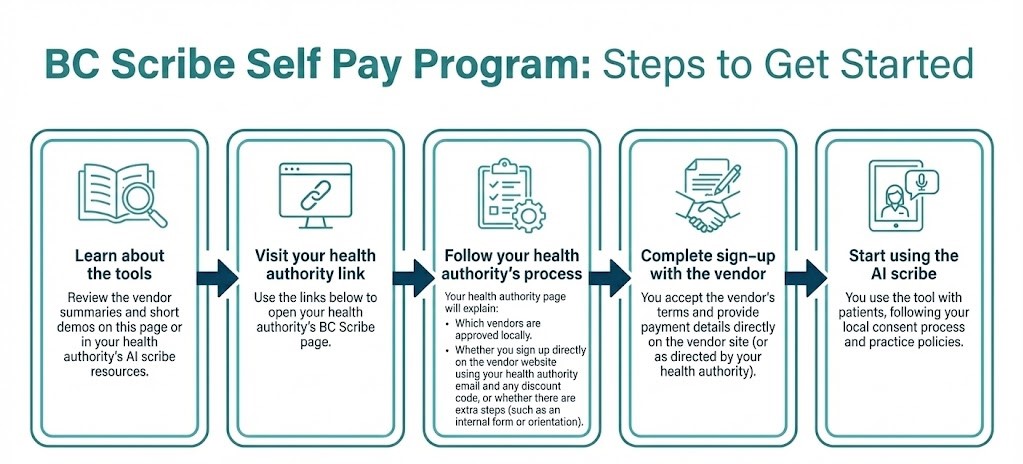
Where Do I Start?
Please visit your health authority link to see which tools are approved for your area, how to sign up, what support is available, and other local details:
Each link will take providers to their own health authority's website, where the detailed instructions live. This keeps HimConnect simple and up to date without having to change wording every time an HA updates its local program.
Each of these pre-qualified vendors meets Canadian privacy/security standards (HIPAA/PIPEDA, SOC 2 where noted) and supports core features like multilingual notes, offline capture, and custom templates:
Availability notes
* Tools marked with an asterisk may not be approved in every health authority.
* Always check your health authority's BC Scribe page for the current list of approved tools and discounts.
Vendors are listed alphabetically and are not ranked. Your health authority decides which vendors are available locally.
- You must use only the health‑authority‑approved version of the tool.
- You are responsible for obtaining patient consent before recording. Short consent scripts and printable handouts are available through your health authority's AI Scribe resources.
- The subscription is a direct agreement between you and the vendor. Issues with billing, refunds, or product features must be discussed with the vendor.
For sign up form, AI toolkit, cheat-sheets, FAQs, and support—visit our *SharePoint Program Hub.
📘 *AI Toolkit – Quick-start guides, cheat sheets, templates
❓* FAQs – Onboarding, troubleshooting, and best practices.
🛠️ *Support Form – Fastest response. Submit questions, onboarding issues, or request one-on-one help.
✉️ Email Support – Prefer email? Reach us at aiscribesupport@phc.ca. Please note: response times may be longer than the Support Form.